
Agency playbook · By Orchcast.AI
Client Approval Checklist for Social Media
Download a client approval checklist and see a filled-in example. Use the social media approval workflow to collect feedback and confirm which revision is ready to publish.
See the approval workflow in Content Board →
Agree on what the client is approving
A vague “looks good” is hard to use when there are several drafts. Define the deliverable, channel, audience, offer and requested decision before review starts. Separate editorial approval from permission to publish through a connected account.
Choose a person responsible for the final decision and a deadline. If legal, product or account teams must review factual statements, make that responsibility explicit. Do not assume a client email approves every future revision.
- Name the owner and intended reviewer.
- Include the content title, channel and revision identifier.
- Attach the factual sources and offer expiry date when relevant.
Prepare a specific revision in Orchcast
Create or edit the draft in Content Factory or Agency Studio, then save the revision. Use Content Board to find the relevant content and check the review options enabled in the workspace.
Team approval workflows are an Enterprise feature. On an eligible workspace, use the available review workflow and permissions to share the selected revision with the intended reviewer. If your plan does not include that workflow, use the downloadable checklist to track decisions in your existing review process; it does not create in-app approval permissions.
Ask for feedback someone can act on
Ask the reviewer to identify the passage, the problem and the desired change. “Replace the launch date with the date in the approved brief” gives a writer a clear action. “Make it better” does not.
Keep changes tied to the review record and confirm which requests were applied. When reviewers disagree, ask the decision owner to resolve the issue before the next revision goes forward. Avoid silently combining feedback that changes the intended offer.
Check the approved version before publication
After a revision, confirm that the decision applies to the latest wording and assets. Check the call to action, destination link, dates, claims and channel requirements. Record the final approved revision and who made the decision.
Before scheduling or publishing, verify the connected channel and the publisher’s permissions. An approved draft is not proof that an account is connected or that a scheduled publication succeeded. Confirm the actual publication result separately.
Filled-in client approval checklist
This example uses a fictional agency campaign. Copy the record structure for your own brief and keep the approval tied to the version reviewed.
A social media agency in India can send one caption and visual for review, consolidate client feedback, then send the revised pair for sign-off. For a bilingual campaign in the UAE, review the English and Arabic drafts side by side. Assign a reviewer for each language and record which revision of each draft is approved.
| Checkpoint | Filled-in example |
|---|---|
| Deliverable | LinkedIn post introducing a downloadable campaign planning worksheet. |
| Owner and reviewer | The agency account lead owns the draft. The client marketing lead makes the approval decision by Thursday at 3 p.m. |
| Revision under review | Revision 2. The brief confirms the worksheet is downloadable. It contains no evidence for the line “plan a campaign in ten minutes”. |
| Decision on revision 2 | Changes requested. Remove the time claim and keep the call to action focused on downloading the worksheet. |
| Decision on revision 3 | Approved by the client marketing lead after the claim was removed. The approval applies to revision 3 only. |
| Publication check | Match the scheduled copy and destination link to revision 3 and verify the publication status separately. |
Test the workflow with two brand voices
Use the same LinkedIn brief with each of two saved brand voices. Ask for a short post introducing a downloadable campaign planning worksheet for agency content leads. Include campaign goal, audience and channel drafts, and invite readers to download it. Exclude time savings, prices, delivery dates and customer outcomes.
From two drafts to an approved revision
32-second development demo with English captions. The test used two voice profiles in one QA workspace, where the owner approved the revised draft.
Read the walkthrough
- Voice A opened by explaining the value of preparing a clear campaign brief.
- Voice B opened with the risk of campaign drift and an unclear starting point.
- Review the opening, vocabulary, worksheet fields and download prompt. Check any claims against the brief. In the revision, we spelled out goal, audience and channel drafts, then saved the new version.
- The workspace owner approved the revision. Content Board showed one approved item and zero published items.
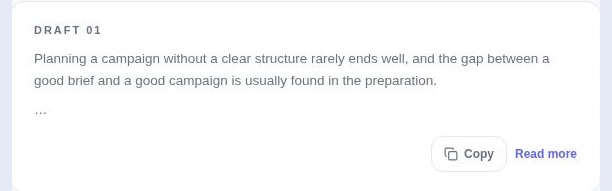
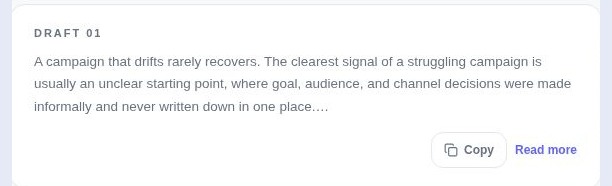

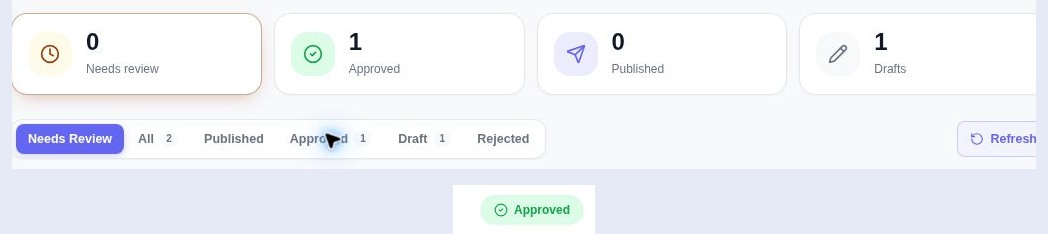
The downloadable checklist is a planning aid. It does not enforce permissions or replace the workspace’s review record. Enterprise eligibility, reviewer access and publishing connections must be checked in the actual workspace.
Use the workflow in Orchcast
Check current plans and feature access before choosing a workflow.
Continue with another agency guide
How agencies maintain different client brand voices
A practical agency workflow for collecting writing samples, reviewing voice profiles and checking AI drafts. Includes a brand voice worksheet.
Read the guide →Agency playbookHow to turn one brief into a multichannel campaign
Prepare a shared campaign brief, create separate channel drafts and review the offer before launch. Includes a downloadable campaign brief template.
Read the guide →


