
Campaign launches · An Orchcast workflow
Turn one campaign brief into coordinated channel drafts.
Give each channel its own draft while preserving the offer, message and call to action.
One client brand · No credit card required · Features and allowances vary by plan.
From first step to reviewed output
How it works
- Set the audience, objective, approved offer and required channels.
- In Campaign Packs, use Gemini with saved Brand Voice materials and the Memory Graph for voice context. Review the evidence before attaching it. Gemini requires workspace permission and available source materials.
- Open saved drafts in Documents and manage full campaigns in Campaigns. Queue GTM Launch drafts for workspace reviewers.
Some features are rolling out. Check your workspace for current availability.
A closer look
See the campaign brief before generation
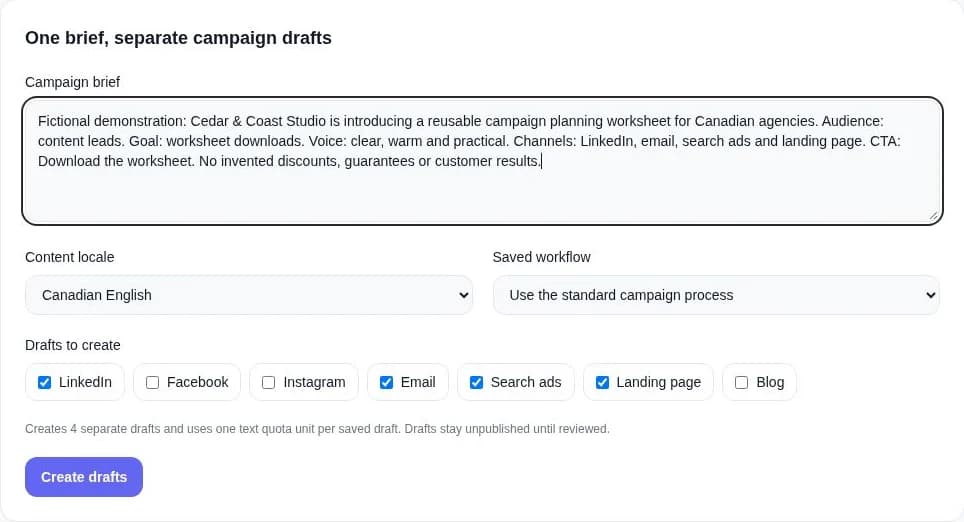
Walk through a small example
- Write one brief with the audience, goal, offer and call to action.
- Choose the locale and channel drafts; check the quota count.
- Create drafts, then edit and review the saved versions before activation.
Campaign Packs produces separate drafts. It does not automatically publish them or verify every factual claim.
Each saved draft uses a text quota unit. Available locales, tools and publishing connections depend on the workflow and plan.
The tools in this workflow
Practical guides and worksheets
Questions about Campaign launches
How can AI help plan a marketing campaign launch?
AI can turn the audience, objective, offer and channel requirements in a campaign brief into related drafts. Orchcast Campaign Packs helps prepare those versions for human review before the campaign is activated.
How do teams launch campaigns with Orchcast?
Set the audience, objective, approved offer and required channels. In Campaign Packs, use Gemini with saved Brand Voice materials and the Memory Graph for voice context. Review the evidence before attaching it. Gemini requires workspace permission and available source materials. Open saved drafts in Documents and manage full campaigns in Campaigns. Queue GTM Launch drafts for workspace reviewers.
Choose a real brief. Start with one brand.
Explore the workflow with your own content, review the results and decide what fits your team. Check pricing for current access, collaboration features and usage allowances.



